
The Repair Project helps people understand regenerative medicine, the evidence behind it and the systems that govern its development and use.
Our principles are Evidence • Innovation • Transparency.
Content should help readers understand the subject, ask informed questions and recognise the distinction between scientific progress, clinical evidence and promotional claims.
The articles provided to contributors may have been created using Outrank or other artificial intelligence tools. AI can help research, structure and develop first drafts, but an AI-generated article is not automatically ready for publication.
Your role is to review the article critically, check it, develop it where necessary and ensure that the finished piece reflects your professional judgement before it is published under your name.
You do not need to rewrite good material simply because it was created using AI. The purpose is to use AI efficiently while ensuring that every published article has been reviewed and approved by a knowledgeable human author.
You are accountable for the accuracy, interpretation and perspective of the finished article.
When reviewing the AI-generated draft:
You do not need to change material simply for the sake of changing it. If a section is accurate, useful, well written and reflects what you would be comfortable saying yourself, it can remain.
AI can provide the starting point. The final professional judgement must be yours.
If you would not stand behind it publicly, it is not ready.
All content should be accurate, responsible and appropriately supported.
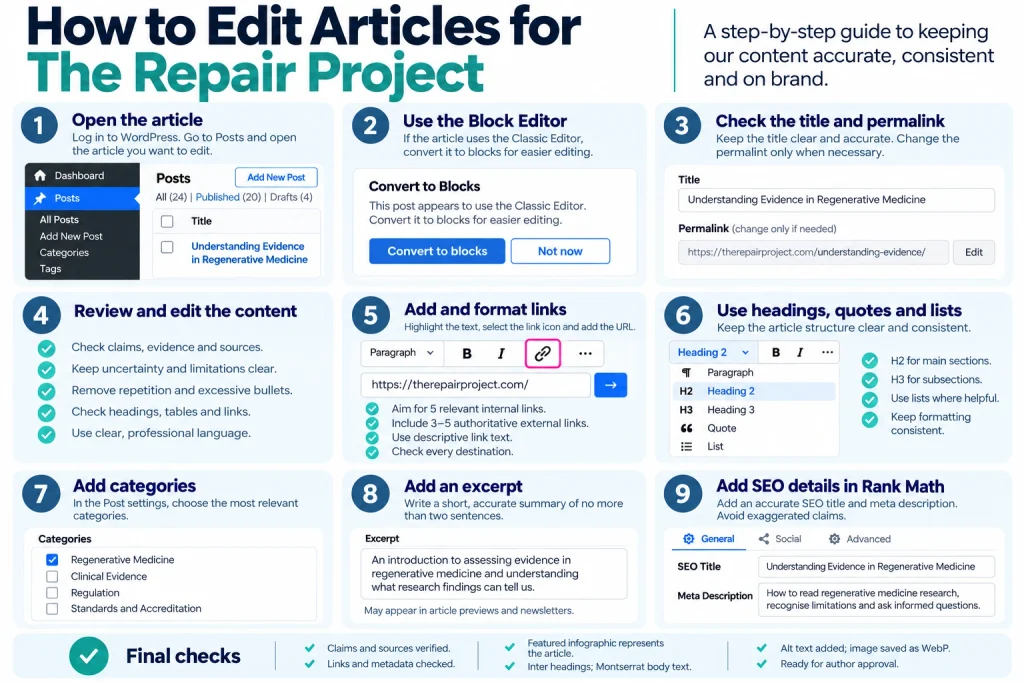
When reviewing the article:
This is particularly important when writing about:
Do not assume that a statistic, citation, quotation, study or source is genuine simply because AI has included it.
Where a claim cannot be substantiated, amend or remove it.
Regenerative medicine covers different technologies, products and applications. Evidence for one intervention must not be presented as evidence for the whole field.
Be specific about the intervention, intended use and evidence being discussed.
Where relevant, distinguish between:
Avoid using “stem cell therapy” as though it describes a single treatment with a single evidence base.
Do not describe an intervention as proven, safe, effective, approved or established without appropriate supporting evidence and context.
Explain what is known, what remains uncertain and what the available evidence can reasonably tell us.
Articles must explain what a particular scheme assesses and what falls outside its scope.
When discussing a regulator, accreditation scheme, certification body or quality standard:
Do not imply that accreditation, certification, registration or inspection alone proves that a particular intervention is safe or effective.
A clinic’s statement that it is “registered” or “certified” should not be repeated without establishing what that means.
Where regulatory status matters, state the country or jurisdiction and the date of verification.
The Repair Project provides information and explanation. Do not portray it as a regulator, certification body or independent assessor of clinics, laboratories or treatments.
Write with an awareness that readers may be dealing with illness, uncertainty or limited treatment options.
Use respectful, clear language. Avoid creating urgency, fear or unrealistic expectations.
Do not:
Where practical guidance is appropriate, help readers identify useful questions about evidence, risks, oversight, costs and follow-up.
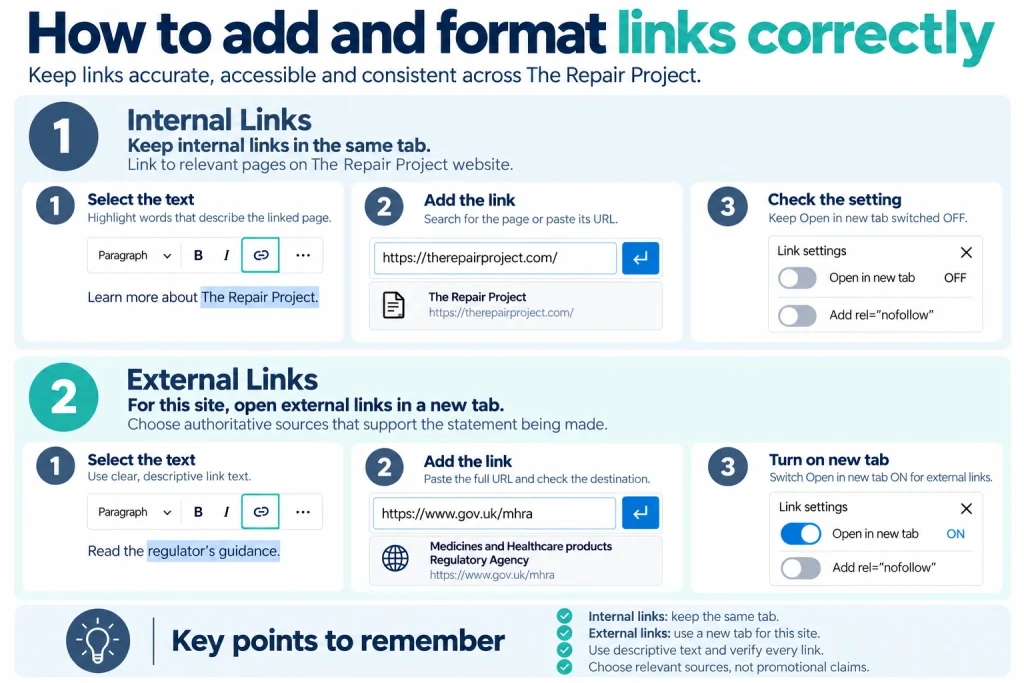
Each article should normally contain three to five relevant external links. Include additional references when the subject requires them.
External links should support evidence, provide context or direct readers to authoritative information.
When reviewing links:
Suitable sources may include:
A provider’s website may establish what that provider claims, but it should not be treated as independent evidence that the claim is correct.
Do not add irrelevant links simply to reach a target number.
Each article should normally contain at least five relevant internal links where suitable published content exists on The Repair Project website.
Internal links may point to:
Use only genuine, working pages. Do not invent resources, programmes or URLs.
Each specific internal article should normally be linked only once.
Internal links should help readers understand the subject and find useful related information. If fewer than five suitable pages exist, use the relevant links available rather than adding unrelated ones.
Optimise the article around specific search phrases that reflect questions readers may ask.
Examples include:
Do not force exact-match keywords into sentences or links.
Avoid keyword stuffing, exaggerated treatment claims and wording that implies benefits unsupported by the evidence.
Search optimisation should support the article’s usefulness and readability.
The Repair Project has an international audience that includes patients, families, clinicians, researchers, industry professionals, policymakers and healthcare leaders.
Content should be:
Use British English and explain essential technical terms.
Write as though speaking to an intelligent reader who wants to understand the subject. Avoid academic language where ordinary words will do.
Articles should invite understanding rather than tell readers what to think.
For personal commentary, begin with a real observation, experience, conversation or question where appropriate. Never invent an experience or anecdote for the author.
For explanatory articles, begin with the practical question or issue the article addresses.
Use connected paragraphs. Avoid excessive headings, repeated conclusions and sequences of unnecessary one-line paragraphs.
When editing:
Do not invent patient stories, professional encounters, quotations or personal experiences to make an article more engaging.
The objective is to produce a credible article that has been reviewed and approved by the person whose name appears on it.
Do not assume that one country’s regulatory or healthcare arrangements apply everywhere.
Check whether statements depend on:
Where evidence comes from one population or setting, do not present it as universally applicable.
Avoid broad statements such as “this treatment is approved” without explaining where and for what use.
Disclose relevant relationships that could affect how readers interpret the article, including commercial interests, advisory roles, funding or affiliations.
Distinguish editorial explanation from promotion.
Do not imply endorsement because an organisation, clinic or company is mentioned.
Follow The Repair Project’s current editorial, governance and conflict-of-interest guidance supplied by the editorial team.
Do not reuse another organisation’s internal links, passwords or operating instructions.
Before submitting, confirm that:
AI provides a useful and efficient starting point.
It allows The Women in STEM Network to identify relevant subjects, develop substantial drafts and build a regular body of useful professional content.
However, AI does not replace the author.
The final article should be credible, thoughtful, accurate, professionally written and aligned with the purpose of The Women in STEM Network.
It should reflect the knowledge and judgement of the person whose name appears on it.
The standard is simple:
AI creates the starting point. The author is responsible for the finished article.
Before publication:
Prepare an accurate SEO title and meta description. Both should describe the article without exaggerating its findings or promising outcomes.
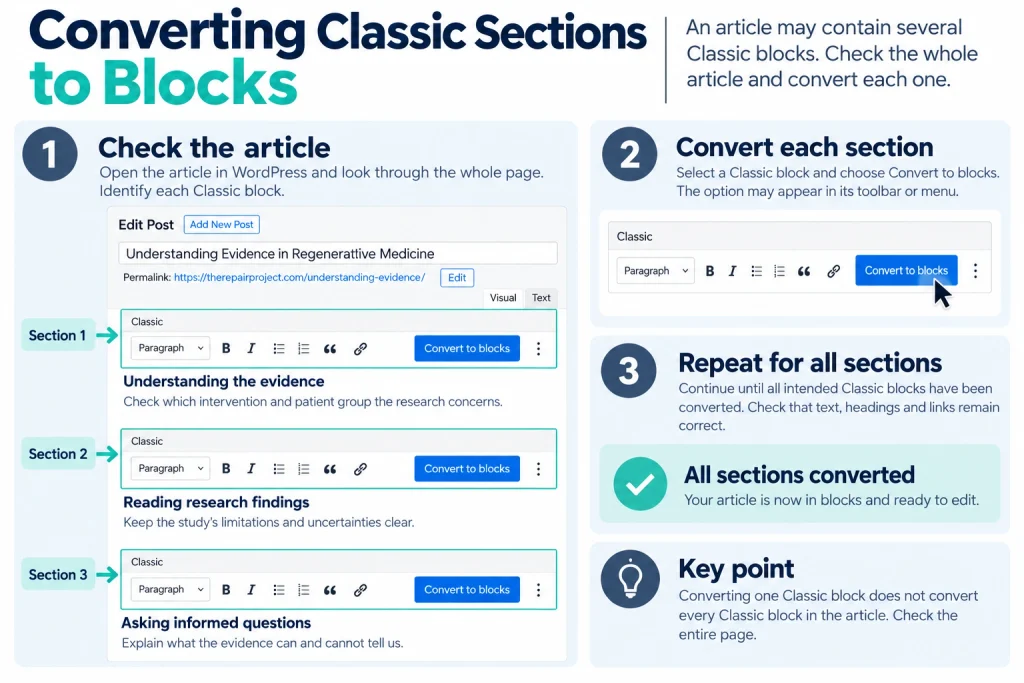
Every article should normally have:
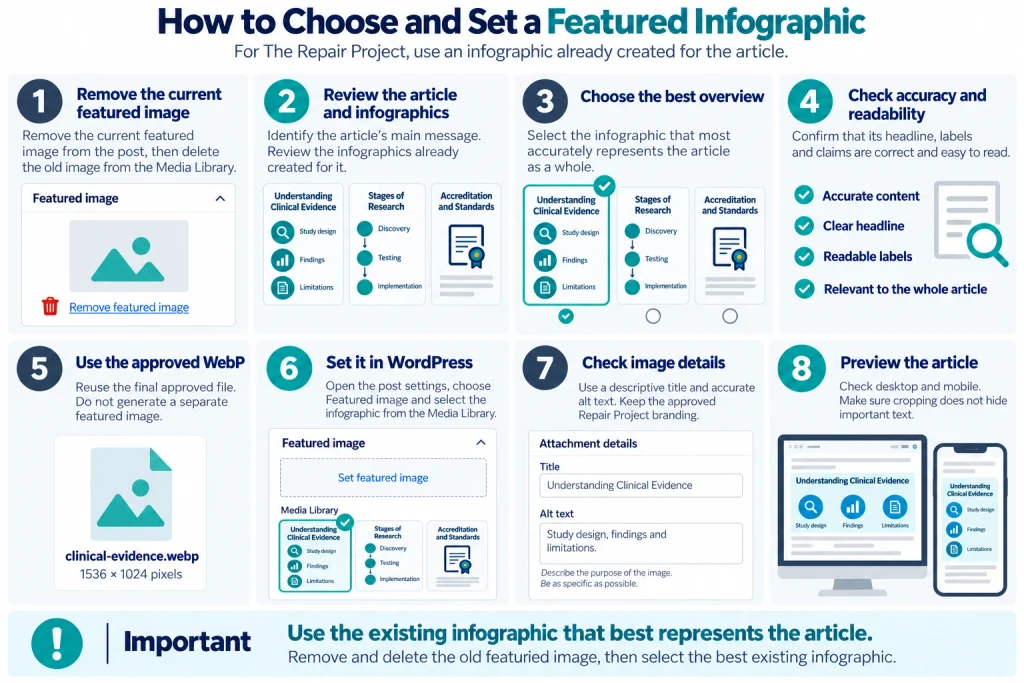
The featured image must be the infographic that best represents the article as a whole. Do not create a separate decorative featured image.
There is no fixed number of supporting images. Include them where they help explain evidence, comparisons, processes or distinctions.
Images should be relevant, accurate, readable and consistent with The Repair Project’s visual identity.
Do not add images simply to break up text.
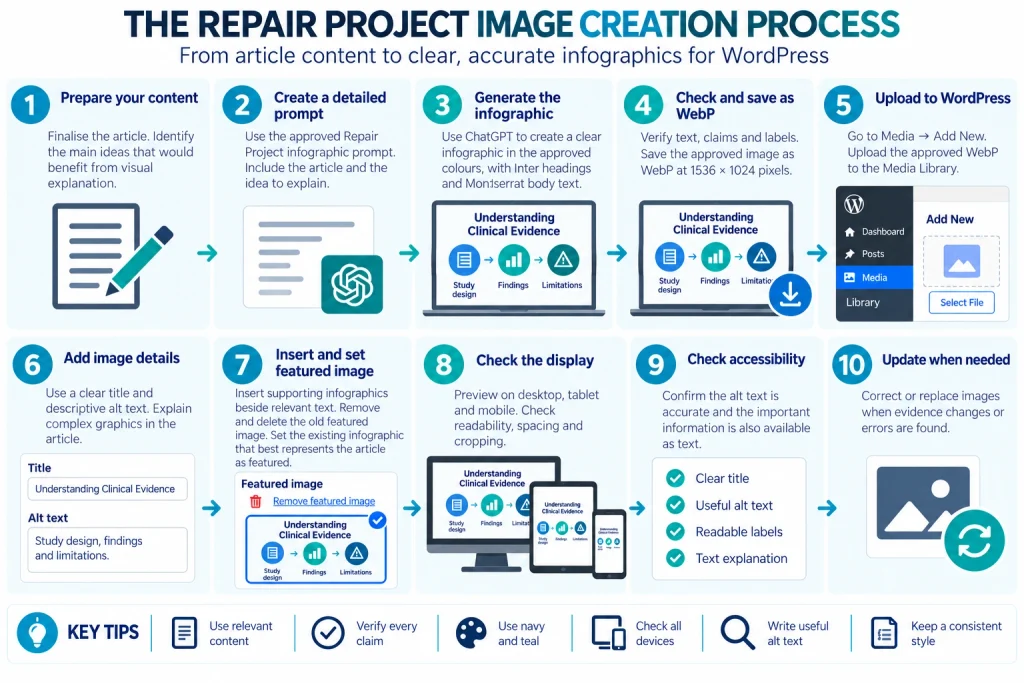
ChatGPT may be used to plan and create infographics.
Use the approved prompt below. Add the article or evidence summary at the end.
Review the proposed subjects before generating. Each infographic should communicate a different central idea.
Create premium editorial scientific infographics for The Repair Project, a regenerative medicine information platform.
Communicate the supplied content clearly and accurately, reflecting the organisation’s principles:
Evidence • Innovation • Transparency
Read the supplied article before planning the images.
Identify its central subject, question or finding, then suggest the infographics that would help readers understand it.
Create only as many infographics as the article needs. Avoid repeating information across images.
Each infographic must communicate one central idea and make sense independently.
The infographic that best represents the article as a whole must also serve as its featured image.
Do not create a separate decorative featured image.
Choose the featured infographic for its relevance to the article’s central subject.
Use a short, descriptive headline that remains understandable outside the article.
Clean, evidence-led, publication-quality scientific infographics.
The finished design should resemble an editorial graphic from a respected international medical or scientific publication.
Communicate scientific credibility, clarity, professionalism and thoughtful scrutiny of evidence.
Present regenerative medicine without hype, exaggerated promises or implied endorsement of treatments or providers.
Patients, families, clinicians, researchers, industry professionals, policymakers and healthcare leaders.
Use accessible language while preserving scientific meaning.
Explain essential technical terms briefly when needed.
Landscape.
1536 × 1024 pixels.
High resolution.
Final delivery suitable for WordPress as a high-quality WebP image.
Pure white: #FFFFFF.
Generous white space.
No decorative background.
No outer frame, border or enclosing outline.
White must extend to every edge.
Primary navy — #102A43
Main headline, important headings and essential structural elements.
Secondary navy — #243B53
Supporting headings, diagram structures and secondary emphasis.
Text blue — #334E68
Body text, explanatory labels and supporting information.
Primary teal — #2FC6B5
Selective emphasis, data markers and key diagram elements.
Supporting teal — #2A9D8F
Icons, connecting lines and supporting visual elements.
Slate blue — #566D8F
Secondary data series and distinctions within diagrams.
Near-black — #2B2C27
Text or scientific details requiring maximum contrast.
Pale backgrounds — #F5F7FA and #EFF4F7
Use sparingly within content groups where separation improves understanding.
White — #FFFFFF
Main canvas and white space.
Keep the overall appearance predominantly white, navy and teal.
Use teal as an accent, not as a large decorative background.
Use dark text on white or pale backgrounds.
Do not use bright teal for small text on white.
Do not rely on colour alone to communicate meaning. Use clear labels and, where needed, different shapes or line styles.
Do not introduce colours outside this palette.
Readability is the highest priority.
Use Inter for headlines, section headings and statistics.
Use Montserrat for body text and figure labels.
Use the specified fonts where supported, or close equivalents with the same character and clarity.
Inter Bold.
Approximately 88–112 px at the final canvas size.
Maximum two lines.
Short, clear and readable at a glance.
Inter Semibold.
Approximately 48–60 px.
Prominent and consistent.
Montserrat Regular.
Approximately 40–48 px.
Use short statements rather than paragraphs.
Montserrat Medium.
Approximately 32–40 px.
Keep labels brief and close to the element they describe.
Inter Bold.
Approximately 60–80 px.
Highlight only statistics that are relevant and supported by the supplied evidence.
These sizes are intended for the final 1536 × 1024 canvas. Scale proportionally if generating at a larger resolution.
Never shrink text to accommodate additional content.
If content does not fit, shorten the wording, remove secondary detail or divide it into separate infographics.
Maintain generous line spacing and clear separation between content blocks.
No overlapping text.
No text placed over illustrations.
Avoid long passages in capitals.
Do not introduce decorative, handwritten or serif fonts.
Use a strong, flexible editorial grid.
Allow approximately 20–25% for the headline and optional subtitle, with the remaining space devoted to the main content. Adjust according to the subject.
No footer.
Large headline aligned left.
A short explanatory subtitle beneath it only when it adds necessary context.
Choose the structure that best explains the supplied information, such as:
Communicate one central idea per infographic.
Do not force every subject into the same template.
Avoid more than four main content groups.
Maintain generous margins and space between sections.
Use visuals that explain the subject:
Illustrations must contribute meaning.
Do not add generic DNA helices, microscopes, cells or laboratory equipment merely to make the image look scientific.
Do not depict biological mechanisms more precisely than the supplied evidence supports.
Preserve the meaning and factual accuracy of the supplied content.
Use British English.
Distinguish clearly, where relevant, between:
Do not imply that accreditation, certification or registration alone proves that a treatment is safe or effective.
Preserve qualifications relating to jurisdiction, indication, population and stage of development.
Do not invent statistics, sources, approval statuses or claims.
Include a concise source label beside a claim when a source is supplied and attribution is necessary. Do not invent references or add a footer.
Do not portray The Repair Project as a regulator, certification body or independent assessor of clinics, laboratories or treatments.
Extremely sharp typography.
Crisp vector-style illustrations and icons.
No spelling errors, distorted letters, clipped text or duplicated words.
No malformed scientific symbols.
Consistent spacing and alignment.
High contrast throughout.
The visual hierarchy should make the central message immediately clear.
The result must feel professionally art-directed for an international scientific or healthcare publication.
1536 × 1024 pixels, landscape.
Pure-white background.
High-quality WebP suitable for WordPress.
Maximum text and image sharpness.
No visible compression artefacts.
Generate at the highest available resolution in the required 3:2 aspect ratio.
After generation, convert the exact approved image to high-quality WebP, resizing to 1536 × 1024 pixels if necessary, without cropping, redesigning or changing its content.
If direct WebP export or conversion is unavailable, state this clearly rather than labelling another image format as WebP.
Identify which infographic should be used as the article’s featured image and briefly explain the choice.
For each final image, provide separately:
Do not place filenames, alt text or editorial notes inside the image.
[Paste the complete article, evidence summary or infographic content here.]
Make it into a WebP file when finished.
After generation, convert the exact final image to high-quality WebP for WordPress without redesigning or altering the composition.
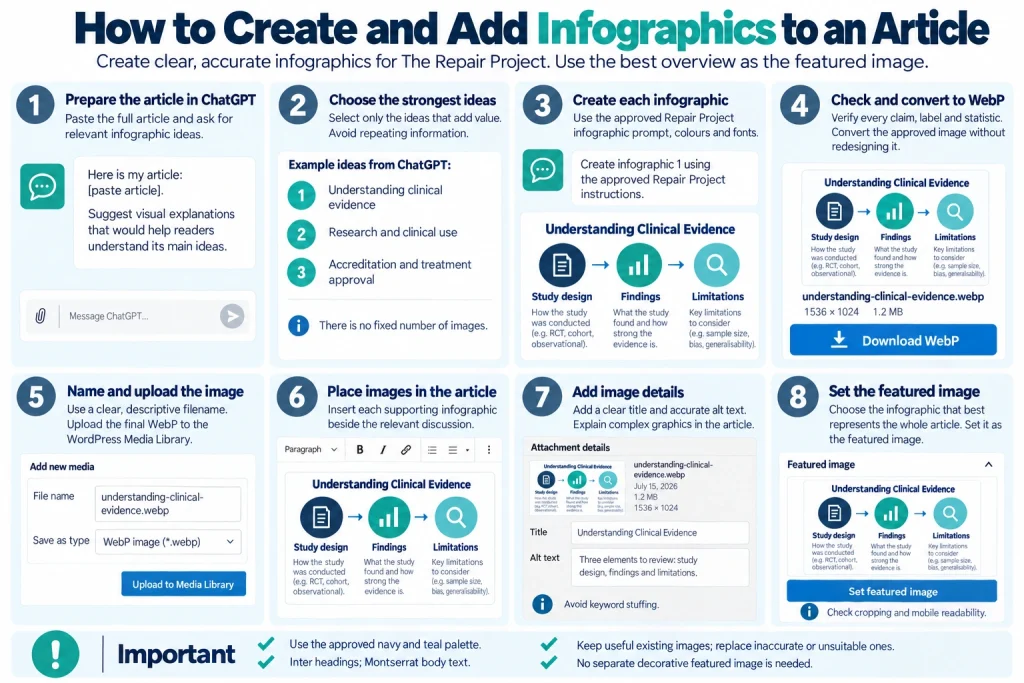
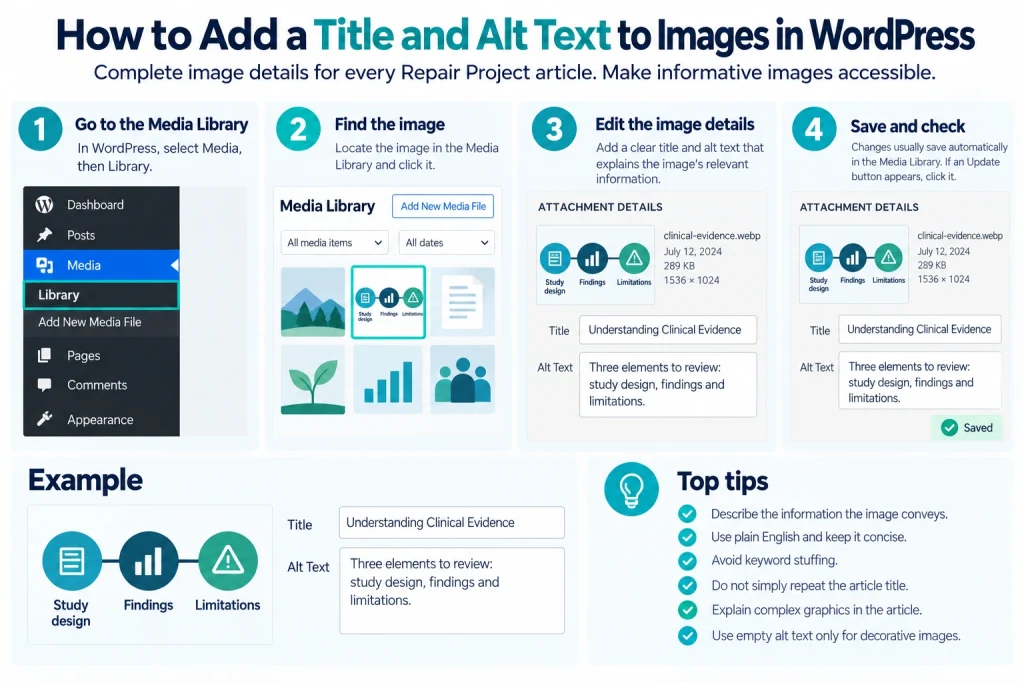
Complete the relevant fields in the WordPress Media Library for every image.
The image title should identify the image in normal language.
Alt text should describe the relevant information or purpose for someone who cannot see it.
Example image title:
Clinical Trial Registration and Regulatory Approval Infographic
Example alt text:
Comparison explaining that clinical trial registration records a study, while regulatory approval concerns a treatment’s authorised use in a particular jurisdiction.
Do not:
For complex infographics, provide the important information in the surrounding article or an accompanying text description. Alt text alone may not convey every detail.
AI-generated infographics must be checked before publication.
Review:
A visually convincing diagram can still be inaccurate.
AI must not invent statistics, findings, quotations, approval statuses or biological mechanisms.
Correct or regenerate any image containing a factual, spelling or visual error before publication.
Use the approved infographic palette:
| Purpose | Colour |
|---|---|
| Main headlines and essential structure | #102A43 |
| Supporting headings and structure | #243B53 |
| Body text and explanatory labels | #334E68 |
| Primary teal accent | #2FC6B5 |
| Supporting teal | #2A9D8F |
| Secondary data and diagram distinctions | #566D8F |
| Near-black text and details | #2B2C27 |
| Pale content panels | #F5F7FA and #EFF4F7 |
| Main background | #FFFFFF |
The overall appearance should remain predominantly white, navy and teal.
Use accents selectively and keep text high contrast.
The Repair Project uses Inter for display text and headings and Montserrat for body text.
Apply this consistently to infographics:
| Element | Typeface |
|---|---|
| Main headline | Inter Bold |
| Section headings | Inter Semibold |
| Body text | Montserrat Regular |
| Figure labels | Montserrat Medium |
| Statistics | Inter Bold |
Use different weights to establish hierarchy.
Use close equivalents only when the specified fonts are unavailable.
Article text should inherit the website’s standard formatting rather than being manually restyled.
Before uploading:
Check that the website’s featured-image crop does not cut off important text. Adjust the display settings where necessary.
If labels are difficult to read on mobile, simplify the infographic or split it into separate images rather than reducing the text size.
Before publication, confirm that:
AI provides a useful starting point. The author is responsible for the finished article.
Every article published by The Repair Project contributes to how readers understand regenerative medicine and how they perceive the organisation and its contributors.
The finished article should be credible, useful, accurate, thoughtful and well presented. It should help readers understand the evidence and recognise the questions that remain.
Most importantly, it should be something you are comfortable having published under your name.